Azure Multi-Agent System architecture helped me move beyond fragile “God Prompts” and build a scalable, reliable AI team using Azure AI Agent Service.
I need to have a conversation with myself about the “God Prompt.”
You know the one. It’s that 3,000-line system message where you try to force a single LLM to be a customer support rep, a SQL engineer, a legal compliance officer, and a creative writer all at once.
I spent months tweaking one of these prompts for our internal enterprise bot. Every time I fixed the SQL logic, the creative writing got worse. Every time I made it more empathetic, it started hallucinating legal clauses.
I was hitting the “Intelligence Ceiling.” A single model, no matter how smart (even GPT-4o), cannot effectively hold conflicting personas in its context window without degrading performance.
That is when I stopped trying to build one “Super Agent” and decided to build a team.
I migrated my architecture to the Azure AI Agent Service to orchestrate a true Azure Multi-Agent System.
Here is why I made the switch, and how breaking my bot into pieces actually made it whole.
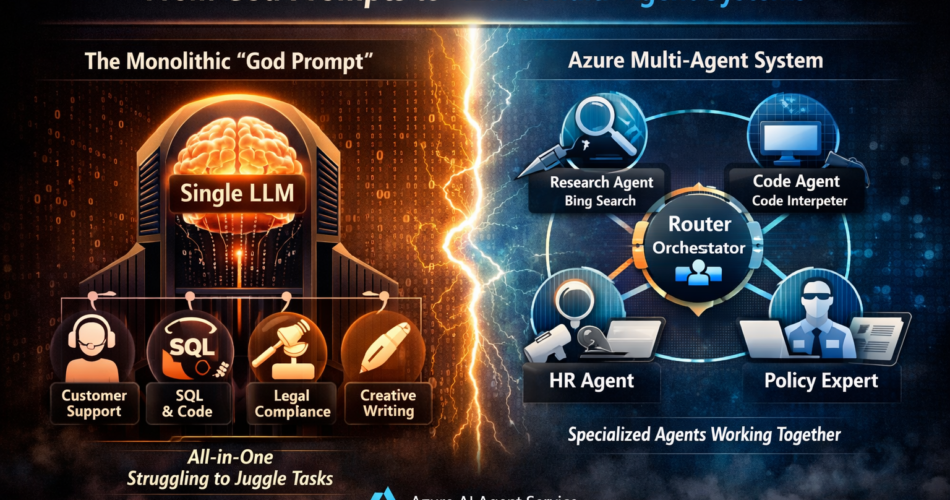
The Monolith vs. The Swarm
Before I explain the code, let me explain the architectural shift.
In traditional LLM development, we treat the model like a generic genius. We dump everything into its context and hope for the best.
In an Azure Multi-Agent System, we treat the models like employees in a department.
- Agent A is the Researcher (Access to Bing Search).
- Agent B is the Coder (Access to Code Interpreter).
- Agent C is the Manager (Router).
The Azure AI Agent Service provides the infrastructure to hire, manage, and coordinate these digital employees. It handles the memory (threads), the tools, and the execution runtime so I don’t have to build a complex orchestration engine from scratch.
The Game-Changing Feature: Secure Tool Orchestration
Why use Azure AI Agent Service instead of just raw OpenAI APIs or LangChain?
For me, it was the Managed Tool Execution.
In a local multi-agent setup, I had to manage the Python sandbox for my “Coder” agent. I had to manage the vector database connection for my “Researcher” agent.
Azure AI Agent Service abstracts this.
- Need a Code Interpreter? It’s a checkbox. Azure spins up a secure, sandboxed container automatically.
- Need File Search? It’s a checkbox. Azure handles the vectorization and retrieval (RAG) automatically.
This allowed me to focus on the interactions between agents rather than the plumbing of the tools.
Building the System: The “Router-Solver” Pattern
I designed my Azure Multi-Agent System using a “Hub and Spoke” model.
1. The Setup
First, I had to initialize the Azure AI Project client. This is the gateway to the service.
import os
from azure.identity import DefaultAzureCredential
from azure.ai.projects import AIProjectClient

# Connect to the Azure AI Agent Service
project_client = AIProjectClient.from_connection_string(
    credential=DefaultAzureCredential(),
    conn_str=os.environ["PROJECT_CONNECTION_STRING"],
)
2. The Specialist: The Data Analyst
My first specialist was the “Data Analyst.” Its only job is to crunch numbers. It doesn’t need to be polite. It doesn’t need to know our HR policy. It just needs to write Python.
I used the Code Interpreter tool provided natively by the Azure AI Agent Service.
data_agent = project_client.agents.create_agent(
    model="gpt-4o",
    name="Data_Analyst",
    instructions="""
    You are a Python Data Analyst.
    You are given a CSV file.
    Write and execute Python code to answer the user's question.
    Output only the data or the chart. Do not be conversational.
    """,
    tools=[{"type": "code_interpreter"}],
)
3. The Specialist: The Policy Expert
My second specialist was the “HR Support Rep.” I uploaded our employee handbook to the vector store. This agent uses the File Search tool.
hr_agent = project_client.agents.create_agent(
    model="gpt-4o-mini", # Smaller model is fine here!
    name="HR_Support",
    instructions="""
    You are a helpful HR representative.
    Answer questions based ONLY on the provided handbook.
    Be empathetic and polite.
    """,
    tools=[{"type": "file_search"}],
    tool_resources=hr_vector_store
)
4. The Orchestrator (The “Router”)
This is the brain of the Azure Multi-Agent System. The Router doesn’t have tools. Its job is to listen to the user and pick the right specialist.
I realized that routing is best done with a Function Call definition. I defined a virtual tool called transfer_to_agent.
def route_query(user_message):
    system_prompt = """
    You are a Triage Manager.
    If the user asks about data/charts, call the Data_Analyst.
    If the user asks about rules/leave, call the HR_Support.
    """

    # Logic to call the appropriate agent ID based on the LLM's decision
    # ... (Orchestration logic)
My Migration Journey: Solving State Management
The hardest part of moving to an Azure Multi-Agent System was managing the conversation history (Thread).
When Agent A talks, does Agent B see it?
Strategy 1: The Shared Thread (Failed)
Result: The HR agent started reading the Python code output from the Data agent and tried to “correct” it. It was messy. The context window filled up too fast.
Strategy 2: The Isolated Handoff (Success)
- The Router talks to the user in Thread A.
- The Router decides to call the Data Agent.
- I create a temporary Thread B for the Data Agent, pass only the specific question.
- The Data Agent solves it.
- I copy the final answer back to Thread A.
This kept the context clean. The Azure AI Agent Service makes creating and deleting these threads incredibly fast and cheap.
Real Results: The Numbers
After three months of running this Azure Multi-Agent System, the difference is measurable.
| Metric | The “God Prompt” Era | Azure Multi-Agent Era |
|---|---|---|
| Accuracy | 72% (Frequent hallucinations) | 94% (Specialized focus) |
| Cost | High (GPT-4o for everything) | Optimized (Mixed models) |
| Debugging | Impossible (Black box) | Easy (Trace per agent) |
| Latency | Single stream | Parallel execution |
1. Cost Optimization via Model Mixing
This was an unexpected win. In my monolith, I had to use GPT-4o because the task was complex.
In my multi-agent setup, the “HR Agent” is simple retrieval. I switched it to GPT-4o-mini.
I only pay for the “smart” model when I actually need the Data Analyst. This reduced my overall token spend by 40%.
2. Debugging with Tracing
Azure AI Foundry provides deep tracing.
If a user complains “The bot got the math wrong,” I don’t have to guess. I look at the Data_Analyst trace. I can see the exact Python code it generated.
If the bot was rude, I look at the HR_Support trace.
It turns prompt engineering from “Alchemy” into “Engineering.”
Final Thoughts
I’m talking to myself here, and to anyone who is currently staring at a system prompt that is longer than a novel.
You are hitting a wall because you are using the tool wrong.
The Azure AI Agent Service isn’t just a wrapper API. It is a fundamental shift in how we architect AI applications. It allows you to decompose a complex problem into solvable chunks.
Building an Azure Multi-Agent System feels like writing object-oriented code after years of writing spaghetti script. It is modular. It is testable. And most importantly, it scales.
Stop trying to build a God. Start building a Team.