When Prompt Engineering Wasn’t Enough
The model was smart.
The prompts were detailed.
The outputs were… inconsistent.
Sometimes it answered perfectly.
Sometimes it ignored instructions it followed just one request earlier.
We added more examples.
We refined prompts.
We layered system messages.
Eventually, it became clear: this wasn’t a prompting problem.
This was the moment Azure OpenAI fine tuning stopped being an abstract feature and became a practical necessity.
What Azure OpenAI Fine Tuning Actually Is
Microsoft provides detailed documentation on fine-tuning workflows, supported models, and training requirements in the official Azure OpenAI fine-tuning documentation.
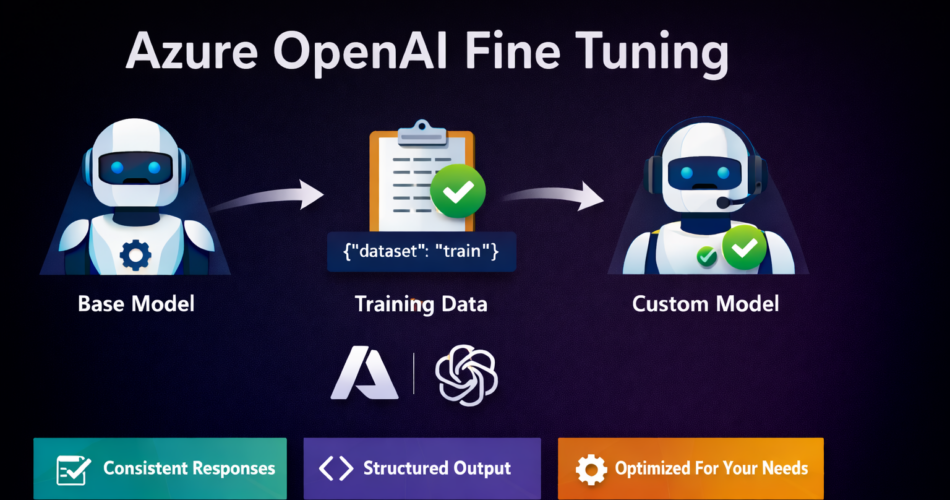
Azure OpenAI fine tuning allows you to adapt a base OpenAI model so it consistently behaves in line with your application’s requirements.
Instead of repeatedly instructing the model through prompts, you train it once using curated examples, allowing the desired behavior to become the default.
Fine tuning is useful when:
- Responses must follow a strict structure
- Tone and format must remain consistent
- Domain language matters
- Prompt complexity is growing out of control
This is not about adding knowledge.
It’s about shaping behavior.
Fine Tuning vs Prompting vs RAG (Quick Clarity)
Before going further, it’s important to draw a clean boundary.
| Approach | Best For | What It Changes |
|---|---|---|
| Prompt Engineering | Light control | One request at a time |
| RAG (Retrieval-Augmented Generation) | Injecting external data | What the model knows |
| Azure OpenAI Fine Tuning | Behavioral consistency | How the model responds |
If your issue is wrong facts, use RAG.
If your issue is unreliable behavior, fine tuning is the right tool.
Models That Support Azure OpenAI Fine Tuning (Updated – 2025)
As of February 2025, Azure OpenAI fine tuning is supported on the following models:
✅ GPT-3.5 Turbo variants
✅ GPT-4o and GPT-4o mini (Generally Available since December 2024)
✅ GPT-4 (0613)
✅ GPT-4.1, GPT-4.1-mini, and GPT-4.1-nano
🔜 o4-mini (announced, with reinforcement fine tuning support)
Model availability can vary by Azure region. Always verify support in your Azure OpenAI resource.
This correction is critical—claims that GPT-4 fine tuning is “not supported” are now outdated.
When Azure OpenAI Fine Tuning Is the Right Choice
Fine tuning is a strong fit when:
- You need predictable output formats
- The model must follow business rules
- Prompts are becoming long and fragile
- Multiple teams depend on the same behavior
- You want lower token usage at inference time
It is not ideal for:
- Rapidly changing knowledge
- One-off experiments
- Small datasets with poor quality
Preparing Training Data (The Most Important Step)
Azure OpenAI fine tuning requires JSONL files.
Each line represents one conversation or instruction.
Example: Training File (training.jsonl)
{"messages":[
  {"role":"system","content":"You are a professional customer support assistant."},
  {"role":"user","content":"My payment failed"},
  {"role":"assistant","content":"I'm sorry to hear that. Could you please confirm the error message you received?"}
]}
Best Practices
- Use real examples, not synthetic filler
- Keep formatting consistent
- Remove edge cases initially
- Quality matters more than volume
A few hundred clean examples often outperform thousands of noisy ones.
Uploading Training Data (Python Example)
from openai import AzureOpenAI

client = AzureOpenAI(
    api_key="AZURE_OPENAI_KEY",
    azure_endpoint="https://your-resource.openai.azure.com/",
    api_version="2024-10-01-preview"
)

training_file = client.files.create(
    file=open("training.jsonl", "rb"),
    purpose="fine-tune"
)

print(training_file.id)
This uploads your dataset to Azure OpenAI for training.
Starting the Fine Tuning Job
job = client.fine_tuning.jobs.create(
    training_file=training_file.id,
    model="gpt-4o-mini"
)

print(job.id)
Training happens asynchronously.
You can monitor progress from Azure Portal or via API.
Evaluating the Fine Tuned Model
Once completed, the job returns a new model ID.
Use it like any other Azure OpenAI deployment:
response = client.chat.completions.create(
    model="ft:gpt-4o-mini:custom-support:v1",
    messages=[
        {"role":"user","content":"My account was charged twice"}
    ]
)

print(response.choices[0].message.content)
This is where the payoff appears:
shorter prompts, more reliable behavior.
Cost Considerations (Important)
Azure OpenAI fine tuning introduces two cost components:
- Training cost (one-time)
- Inference cost (per request, usually slightly higher)
However:
- Shorter prompts often reduce total token usage
- Fewer retries save operational cost
- Predictable outputs reduce human review effort
Fine tuning is rarely cheaper upfront—but often cheaper at scale.
Responsible AI Considerations
Fine tuning amplifies whatever you teach the model.
That means:
- Bias in training data becomes bias in output
- Unsafe examples become default behavior
Best practices:
- Review datasets carefully
- Avoid sensitive attributes unless required
- Test across user groups
- Document model intent and limitations
Azure provides Responsible AI tooling inside Azure Machine Learning to support audits and reviews.
Frequently Asked Questions (EPCL Accordion)
What is Azure OpenAI fine tuning used for?
Is fine tuning better than RAG?
Which GPT-4 models support fine tuning?
How much data is required for fine tuning?
Can fine tuned models be updated later?
Final Thoughts
Azure OpenAI fine tuning isn’t about making models smarter.
It’s about making them reliable.
When behavior matters more than creativity,
when consistency matters more than flexibility,
when prompts are becoming fragile—
Fine tuning becomes the correct engineering decision.
Used carefully, it simplifies systems, reduces errors, and restores confidence in AI-driven workflows.
That’s not magic.
That’s discipline.
And that’s exactly what fine tuning delivers when done right.