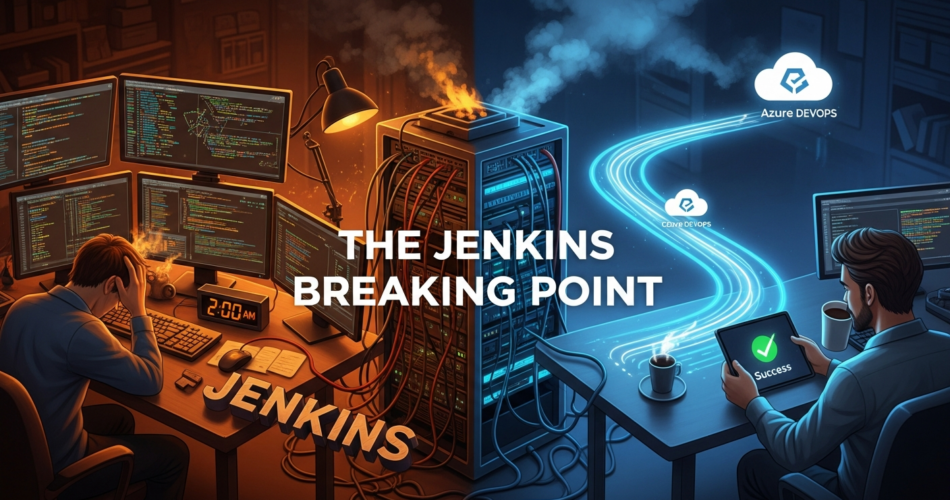
Jenkins to Azure DevOps CI/CD pipeline comparison
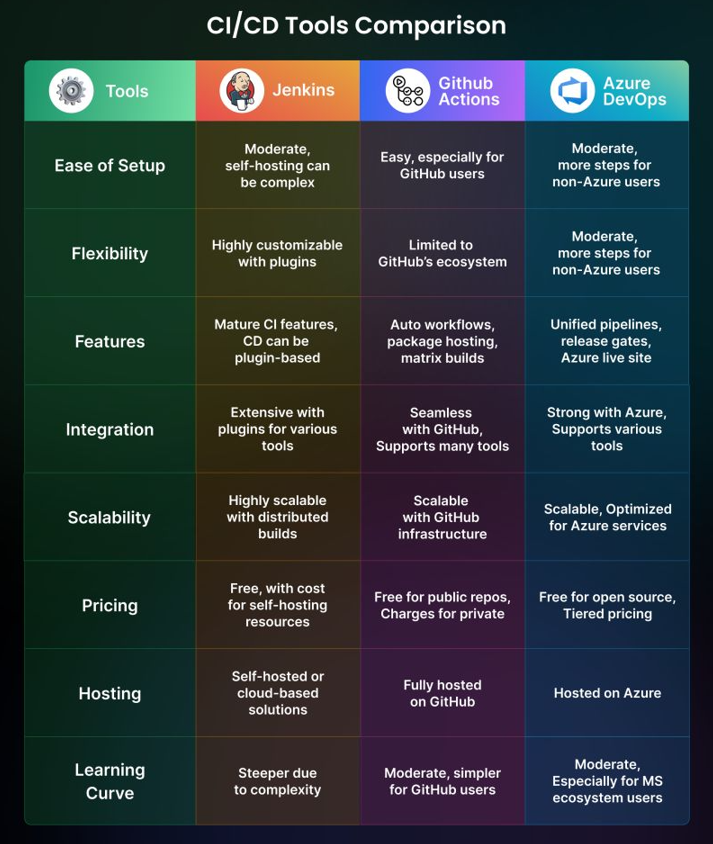
Moving from Jenkins to Azure DevOps was not a sudden decision—it was the result of years of fighting fragile pipelines, plugin failures, and security risks.
I need to be honest with myself.
For years, I defended Jenkins like it was my own creation. I spent weekends fixing broken builds, late nights updating plugins, and way too many hours restarting a server that was supposed to make my life easier.
And yet, I kept telling myself, “This is normal. This is just DevOps.”
It wasn’t.
The moment that finally broke me came at 2:00 AM on a weekday. A pipeline that had been “stable” for months failed after a routine plugin update. No code change. No config change. Just Jenkins being Jenkins.
That night, I stopped asking how to fix Jenkins and started asking a more dangerous question:
Why am I still using it?
The Jenkins Reality Check
I used to love Jenkins for its flexibility. Open-source. Endless plugins. Full control.
But that flexibility slowly turned into chaos.
My Jenkins setup depended on dozens of plugins just to function like a modern CI/CD system. Git, credentials, Docker, notifications—everything needed a plugin. And every plugin came with its own dependencies, update cycle, and breaking changes.
Looking back, this was the first clear sign that moving from Jenkins to Azure DevOps would eventually become unavoidable.
Plugin compatibility became my biggest enemy.
One update fixed a bug but broke authentication. Another update required a newer Jenkins core version, which broke half the installed plugins. Rolling back wasn’t always clean either.
I wasn’t a DevOps engineer anymore.
I was a Jenkins caretaker.
The Security Wake-Up Call
During an internal audit, I was asked a simple question:
“Where are your production secrets stored?”
My answer didn’t feel good.
They were encrypted, yes—but still stored locally on the Jenkins server. Anyone with VM access could potentially access them. Secret rotation was manual, slow, and risky.
That was the moment I realized Jenkins wasn’t just slowing us down—it was increasing risk.
The Discovery Moment
I didn’t plan to migrate that day.
I was casually browsing discussions about CI/CD alternatives when I kept seeing one suggestion repeated:
At first, I ignored it. Another platform. Another learning curve. Another lock-in.
But then I looked closer.
What caught my attention wasn’t the UI.
It wasn’t the dashboards.
It was how Azure DevOps handled identity, pipelines, and Azure integration—natively.
The One Feature That Made Me Move from Jenkins to Azure DevOps
The feature that made me move wasn’t just “YAML pipelines”.
It was YAML pipelines combined with native Azure service connections. You can read more about Azure service connections in the official documentation.
That combination removed entire categories of problems I had been fighting in Jenkins for years.
Infrastructure as Code (Finally Done Right)
In Azure DevOps, my pipeline became a simple file:
azure-pipelines.ymlThat file lives inside the repository. It’s version-controlled. It’s reviewed. It’s documented by default.
No hidden UI configs.
No mystery jobs.
No “only one person knows how this works.”
Jenkins vs Azure DevOps: The Credential Problem
This is what my Jenkins deployment logic looked like.
node {
    stage('Deploy') {
        withCredentials([usernamePassword(
            credentialsId: 'azure-prod',
            usernameVariable: 'CLIENT_ID',
            passwordVariable: 'CLIENT_SECRET'
        )]) {
            sh """
            az login --service-principal \
              -u $CLIENT_ID \
              -p $CLIENT_SECRET \
              --tenant $TENANT_ID

            az webapp deploy --name my-app --src-path build.zip
            """
        }
    }
}
It worked—but it was fragile, verbose, and risky.
Now compare that with Azure DevOps.
- task: AzureWebApp@1
  inputs:
    azureSubscription: 'Production-Connection'
    appName: 'my-app'
    package: '$(System.DefaultWorkingDirectory)/**/*.zip'
That’s it.
No secrets in code.
No secrets in pipeline variables.
Azure DevOps handles authentication securely in the background.
I deleted hundreds of lines of credential-handling logic overnight.
Environments and Approval Gates (No More Guesswork)
Another feature I didn’t realize I needed was Environments.
Azure DevOps lets me define environments like:
- Dev
- QA
- Staging
- Production
Each environment supports:
- Manual approvals
- Deployment history
- Access restrictions
Production deployments no longer depend on trust or Slack messages.
They depend on explicit approval gates defined in code.
That alone improved confidence across the team.
My Migration Journey
I didn’t shut Jenkins down overnight.
Phase 1: Audit
I reviewed every Jenkins job. Surprisingly, nearly 30% of them existed only to work around Jenkins limitations.
Those jobs didn’t survive the migration.
Phase 2: YAML Refactor
Groovy logic mapped cleanly to YAML.
Jenkins: sh "npm install"
Azure DevOps: - script: npm install
Developers could now read and modify pipelines themselves—no UI access needed.
Phase 3: Parallel Run
For two weeks, Jenkins and Azure DevOps ran side by side.
After three successful production deployments in Azure DevOps, I shut Jenkins down.
And I didn’t miss it.
Real Results After Migration
| Metric | Jenkins | Azure DevOps |
|---|---|---|
| Weekly Maintenance | 4–5 hours | < 30 minutes |
| Security Audits | Stressful | Effortless |
| Pipeline Failures | Frequent | Rare |
| Infra Cost | Dedicated VM | Managed Service |
Is Azure DevOps Perfect?
No tool is.
But when I compare my day-to-day experience after moving from Jenkins to Azure DevOps, the trade-offs are absolutely worth it.
YAML is strict.
Indentation errors hurt.
And yes—there is vendor lock-in.
But compared to managing a fragile CI server, those are trade-offs I’m comfortable making.
Final Thoughts
I didn’t move from Jenkins to Azure DevOps because Jenkins is bad.
I moved because modern DevOps needs pipelines that understand identity, security, and cloud platforms by default.
For me, that one feature—YAML pipelines with native Azure integration—made the decision obvious.
If you’re still restarting Jenkins at odd hours or fighting plugin updates, maybe it’s time to ask the same question I did:
Why am I still using this?