Azure OpenAI rate limits become a real concern the moment an AI application moves from development into production. During early testing, everything usually works perfectly. A developer sends prompts to the model, receives responses instantly, and the system behaves exactly as expected. Then, real users arrive.
Multiple requests begin hitting the API simultaneously. Prompt sizes grow as applications include conversation history, system instructions, and retrieved documents. Suddenly, responses start failing with 429 errors. The model itself isn’t failing. The system is hitting rate limits. Small development workloads rarely exceed quotas, but real applications quickly reach limits on tokens per minute (TPM) or requests per minute (RPM).
Understanding how Azure OpenAI rate limits work, and designing systems around them, is absolutely essential for building reliable, production-grade AI applications.
Understanding Azure OpenAI Rate Limits
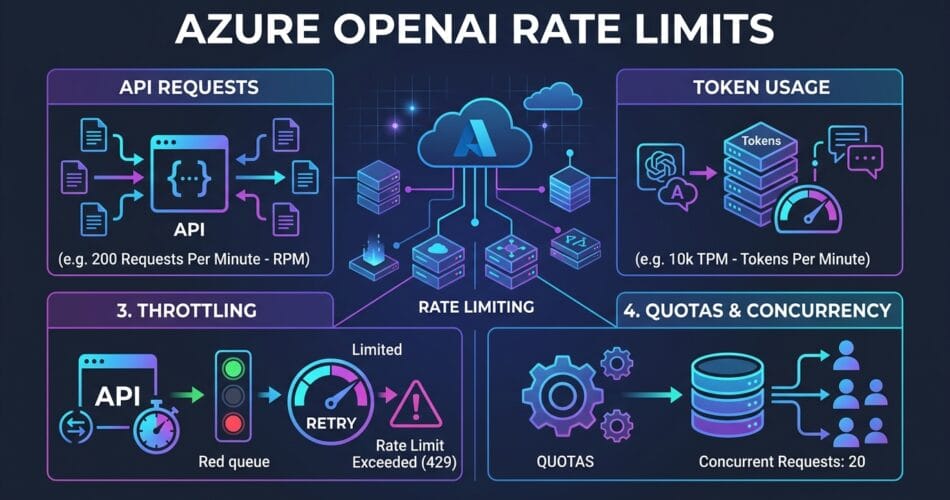
Azure OpenAI controls throughput using two primary quotas: Requests per minute (RPM) and Tokens per minute (TPM). These limits protect the platform from overload and ensure fair resource usage across all enterprise customers.
RPM vs TPM
RPM limits how many API requests your application can send each minute, while TPM limits the total tokens processed per minute, including both input tokens and output tokens. For example, if you send 10 requests per minute and each request uses 2000 tokens, your total usage is 20,000 TPM. Even if request limits are not exceeded, the system can still throttle traffic if TPM limits are reached.
Regional Quotas and Deployment Allocation
Azure OpenAI quotas are allocated per subscription, region, and model. For example, you might have a GPT-4 deployment in East US and a GPT-3.5 deployment in West Europe. Each deployment has independent rate limits, allowing organizations to distribute traffic across multiple regions. This is a common and highly recommended scaling strategy in production AI systems.
Furthermore, Azure assigns a quota pool per model per region. If you have 240,000 TPM available for GPT-4, you can distribute it across deployments. You could have one deployment with the full 240k TPM, or two deployments with 120k TPM each. This allows teams to precisely balance throughput across different environments or workloads.
Handling Rate Limits with Exponential Backoff and Jitter
When quotas are exceeded, Azure returns a 429 Too Many Requests response. This indicates the service is protecting its throughput capacity. Production systems must be designed to handle these responses gracefully using exponential backoff with jitter.
Adding “jitter” (a small random delay) prevents the “thundering herd” problem, where multiple failing instances retry at the exact same millisecond and immediately trigger another 429 error.
import time
import random
import openai

MAX_RETRIES = 5

for attempt in range(MAX_RETRIES):
    try:
        response = client.chat.completions.create(
            model="gpt-4",
            messages=[{"role": "user", "content": prompt}]
        )
        break
    except openai.RateLimitError as e:
        if attempt == MAX_RETRIES - 1:
            raise e
        # Calculate backoff with jitter
        sleep_time = (2 ** attempt) + random.uniform(0, 1)
        time.sleep(sleep_time)
This approach prevents retry storms while still allowing temporary spikes to recover smoothly. Immediate retries worsen throttling, whereas exponential backoff with jitter gradually increases wait times while staggering the retries.
Advanced Strategies to Prevent Throttling
Production AI systems require architectural strategies that respect API quotas. Here are the top approaches to ensure your agents never get stuck:
1. Token Optimization
Reducing token usage often yields the biggest scalability improvements. Common techniques include summarizing conversation history, limiting retrieved documents, compressing prompts, and removing redundant system instructions. Dropping a prompt from 4000 tokens to an 800-token summary allows significantly more requests within your TPM limits.
2. Queue-Based Architectures
High-traffic AI systems often rely on asynchronous processing. By introducing a message queue (like Azure Service Bus or Azure Queue Storage) between your API Gateway and your Worker Service, you can smooth traffic spikes. The queue prevents sudden bursts from overwhelming rate limits. While this introduces slight latency, the trade-off dramatically improves system reliability.
3. Smart Load Balancing with Azure API Management (APIM)
To implement robust load balancing, organizations use Azure API Management (APIM). APIM can dynamically route traffic to healthy, non-throttling Azure OpenAI backends across different regions.
By implementing a Circuit Breaker Pattern in APIM, the system can seamlessly transition to alternate regional instances based on the Retry-After header provided by the backend. You can also enforce token-based rate limits per API consumer, preventing a single internal team from monopolizing the entire OpenAI quota.
4. Provisioned Throughput Units (PTUs) vs Pay-As-You-Go
For mission-critical applications requiring consistent latency, Azure offers Provisioned Throughput Units (PTUs). Unlike the Pay-As-You-Go (PAYG) model, PTUs provide dedicated capacity and guaranteed throughput for a fixed hourly fee.
The best practice here is a Hybrid Deployment Strategy: Use PTUs for your predictable baseline workloads to ensure maximum reliability, and configure a PAYG deployment as a “spillover” backend in APIM to handle unexpected traffic surges.
5. Monitor Token Usage and Telemetry
Managing rate limits effectively requires constant monitoring. You should track tokens per request, requests per minute, API latency, and throttling errors using tools like Azure Monitor and Application Insights. Here is a simple logging implementation:
import logging

logger.info(
    "openai_request",
    extra={
        "input_tokens": input_tokens,
        "output_tokens": output_tokens
    }
)
Final Thoughts on Production AI
Rate limits are not an error condition – they are an architectural constraint. Systems designed without considering quotas often work during development but fail under production traffic. Most AI systems evolve from direct API calls at low traffic, to token optimization at moderate traffic, and finally to queue-based processing, APIM load balancing, and PTUs at the enterprise scale.
Designing with rate limits in mind from the beginning ensures your applications remain stable as user demand increases. Let’s build resilient infrastructure.
Related Reading: If you want to dive deeper into securing and observing these workloads, check out our recent guides on Observability and Silent Failures and Managing State with Cosmos DB.