
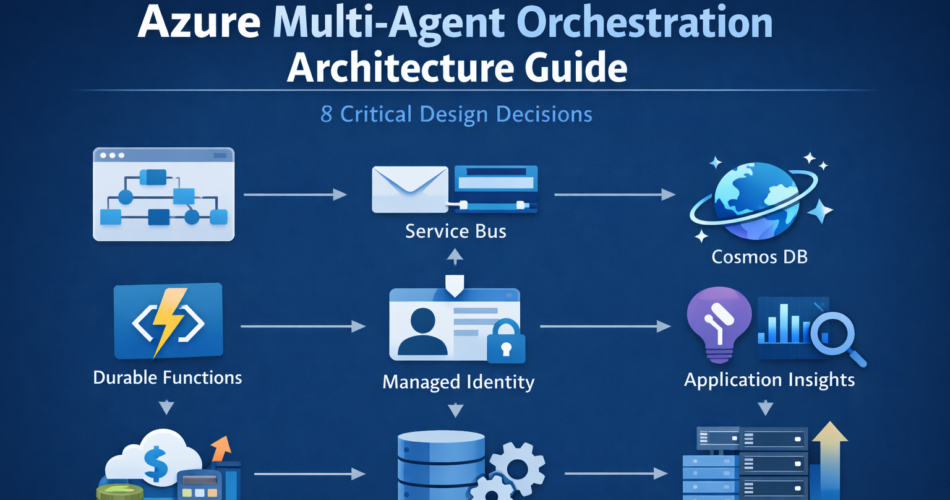
Azure multi-agent orchestration architecture guide becomes necessary the moment your agent workflow stops being a single prompt-response loop and starts coordinating multiple reasoning steps under real production traffic.
In staging, a planner delegates to a researcher agent. The researcher calls Azure AI Search. A summarizer produces the final output. Everything appears deterministic.
Then production traffic arrives.
Two planner instances race under concurrency. A retry duplicates a downstream API call. Token usage increases because intermediate context is resent across agents. A transient dependency failure causes partial recomputation instead of isolated recovery.
Nothing crashes.
But latency drifts. Costs rise. Auditability becomes unclear.
In this Azure multi-agent orchestration architecture guide, we focus on the architectural decisions that prevent that silent degradation. Systems degrade unless orchestration, identity, and state boundaries are explicit, and infrastructure discipline determines long-term stability.
1. Orchestration Runtime: Durable Functions vs AKS
The first design decision is where orchestration logic runs.
On Azure, that usually means choosing between Azure Durable Functions and an orchestrator deployed on Azure Kubernetes Service (AKS).
Durable Functions provide:
- Deterministic replay
- Built-in checkpointing
- Fan-out / fan-in orchestration
- State persistence managed by the framework
However, determinism is not just a minor constraint. Durable orchestrator functions cannot perform non-deterministic operations directly. That includes:
- Calling external services inline
- Using random number generation
- Reading system time dynamically
- Performing dynamic branching based on uncontrolled side effects
All external work must be delegated to activity functions. If your planner relies on unpredictable runtime branching or dynamic tool discovery, you must structure that logic carefully to preserve deterministic replay.
AKS-based orchestration removes those constraints and allows complete flexibility in branching and runtime behavior.
Tradeoff:
- Durable Functions reduce operational complexity but impose deterministic workflow rules.
- AKS provides flexibility but requires you to design replay, persistence, and failure handling manually.
If your workflows are structured and auditable, Durable Functions are usually the correct default.
2. Messaging Backbone: Service Bus as Isolation Layer
Agents should not call each other directly.
Instead, use Azure Service Bus to decouple execution:
- Planner emits structured task messages.
- Agent workers consume independently.
- Results are persisted.
- Orchestrator advances state.
This provides:
- Controlled retries
- Dead-letter isolation
- Backpressure under load
- Independent scaling
Tradeoff:
- Message duplication is possible.
- Handlers must be idempotent.
The architectural decision here is whether coordination is synchronous or event-driven. For production workloads, event-driven orchestration with Service Bus reduces coupling and improves resilience.
3. State Modeling: Cosmos DB as Workflow Authority
Prompt memory is not durable state.
In production, workflow state must live in a structured store such as Azure Cosmos DB. This allows:
- Explicit status transitions
- Replay without regeneration
- Partitioning by workflow_id
- Predictable RU scaling
Example document:
{
  "workflow_id": "wf-1024",
  "status": "TASK_QUEUED",
  "completed_steps": ["intake_agent"],
  "retry_count": 1,
  "planner_version": "v3"
}
Design decision:
Should state be implicit in prompts or explicit in structured storage?
Explicit state increases engineering effort but enables deterministic recovery and auditability. Implicit state lowers initial complexity but makes retries unpredictable and costly.
Cosmos DB introduces RU cost considerations, so partitioning strategy and indexing policies must be designed early.
4. Identity Enforcement: Managed Identity Boundaries
In a secure architecture, reasoning and execution operate under separate trust domains.
Use Managed Identity through Microsoft Entra ID for tool execution. Agents should propose actions. Infrastructure validates and executes them.
For example:
- Agent proposes blob deletion
- Function validates role assignment
- Managed Identity executes operation
Tradeoff:
- Additional validation logic
- Slight latency overhead
Advantage:
- Prompt injection cannot directly escalate privileges
This decision defines whether AI actions are governed by policy or by prompt logic.
5. Observability Architecture: Application Insights + Azure Monitor
Observability is not optional in multi-agent systems.
Instrumentation should include:
- workflow_id
- agent_name
- step_name
- retry_count
- input_tokens
- output_tokens
- dependency latency
Using OpenTelemetry with Application Insights, traces become correlated across steps:
with tracer.start_as_current_span("planner_step") as span:
    span.set_attribute("workflow_id", workflow_id)
    run_planner()
In Azure Monitor, KQL queries surface drift — especially when compared to approaches discussed in our Datadog to Azure Monitor migration guide.
AgentLogs
| summarize avg(input_tokens), avg(retry_count) by agent_version
Tradeoff:
- Telemetry ingestion cost
- Engineering overhead
Advantage:
- Early detection of retry storms and token growth
The design decision is whether telemetry is treated as debugging output or as an architectural control surface.
6. Scaling Strategy: Coordinated Resource Provisioning
Scaling multi-agent systems is not just increasing instance count.
Azure introduces four scaling surfaces:
- Durable Functions concurrency
- Service Bus throughput units
- Cosmos DB RU/s
- Azure OpenAI rate limits
The design decision is whether scaling is reactive or capacity-modeled.
Before production, perform load simulation:
- Increase concurrent workflows gradually
- Monitor RU consumption
- Measure queue latency
- Track token amplification
Right-sizing example:
- Partition Cosmos DB by workflow_id
- Provision RU based on peak concurrent writes
- Configure Service Bus sessions if ordering matters
- Cap fan-out parallelism to prevent token duplication
Tradeoff:
- Higher baseline infrastructure cost
- Lower risk of retry cascades
Scaling must be coordinated across layers. If Cosmos DB throttles, Durable Functions replay increases, which multiplies token usage. Infrastructure misalignment often costs more than model usage.
7. Failure Isolation and Replay Discipline
Replay semantics are powerful but dangerous if misused.
Durable Functions replay orchestrator logic when recovering. If agent outputs are not persisted explicitly, replay regenerates reasoning and consumes tokens again.
Architectural rule:
- Persist structured intermediate outputs
- Mark steps complete atomically
- Ensure activity functions are idempotent
Example state progression:
REQUEST_RECEIVED
→ PLANNED
→ TASK_DISPATCHED
→ AGENT_COMPLETED
→ FINALIZED
If a downstream dependency fails at AGENT_COMPLETED, only that node retries.
Tradeoff:
- More state transitions
- Increased modeling complexity
Advantage:
- Contained failure domains
- Predictable cost behavior
Without isolation, retries amplify computation rather than recover it.
8. Cost Architecture: Modeling the Full Envelope
Token pricing is only one variable.
Total cost includes:
- Azure OpenAI tokens
- Cosmos DB RU consumption
- Service Bus throughput
- Durable Function execution time
- Azure Monitor log ingestion
Hidden amplification occurs when:
- Planner resends full context to every agent
- Retries regenerate summaries
- Fan-out depth increases without bounds
Mitigation strategies:
- Summarize conversation history
- Persist intermediate structured results
- Pass references instead of raw text
- Cap maximum branch depth
Tradeoff:
- Reduced dynamic flexibility
- More up-front engineering
Advantage:
- Stable cost profile under load
Cost modeling must be part of architectural design, not a post-deployment reaction.
When Multi-Agent Orchestration Is Justified
Multi-agent architecture on Azure is appropriate when:
- Workflows require deterministic replay
- Audit trails are mandatory
- Tasks benefit from specialization
- Parallelism meaningfully reduces latency
It is unnecessary when:
- Workflows are shallow
- Tool usage is minimal
- Governance boundaries are simple
- Concurrency is low
Choosing multi-agent architecture should follow operational requirements — not architectural preference.
Final Thoughts
This Azure multi-agent orchestration architecture guide emphasizes a single principle: distributed reasoning requires distributed discipline.
Stable systems on Azure depend on:
- Deterministic orchestration
- Decoupled messaging
- Explicit state modeling
- Identity enforcement
- Structured observability
- Coordinated scaling
- Cost envelope awareness
Multi-agent orchestration increases architectural control while increasing operational burden.
The real tradeoff is not simplicity versus sophistication.
It is flexibility versus predictability.
Design explicitly for replay, scaling alignment, and identity boundaries. If those controls are in place, multi-agent systems remain stable under load. If they are implicit, silent degradation becomes inevitable.
This Azure multi-agent orchestration architecture guide ultimately comes down to disciplined state, identity, and replay boundaries.