
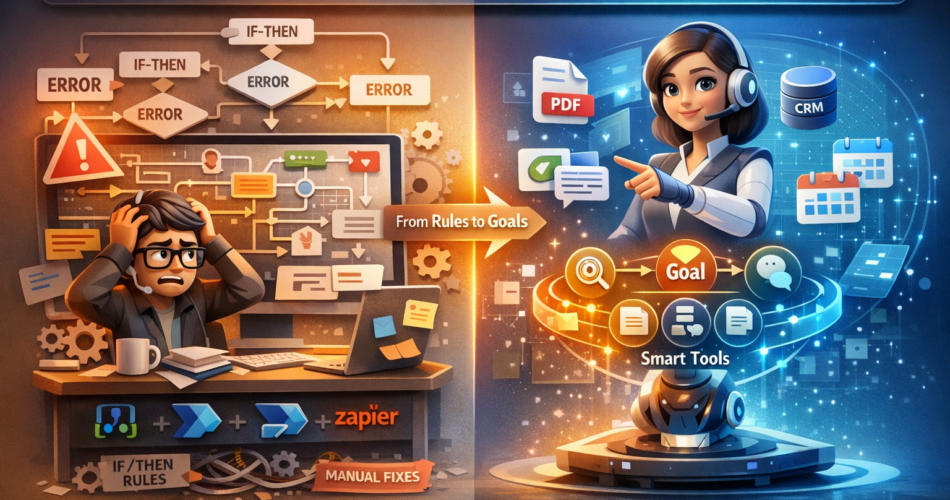
AI Orchestration is the reason I completely rethought how I automate work—and why I walked away from traditional workflow automation entirely.
I need to have a conversation with myself about the “automation” empire I built over the last five years.
It was a masterpiece of fragility.
I had hundreds of Logic Apps, Zapier zaps, and Power Automate flows running critical parts of the business. I felt like a wizard. I could wire up a webhook to a database trigger in my sleep.
But then, the cracks appeared. A vendor would change their invoice format by one column, and my Regex parser would explode. A customer would send an email with a typo in the subject line, and my “smart” routing logic would dump it into the void.
I realized I wasn’t an Automation Engineer. I was a Digital Babysitter.
I was spending my weekends patching if/else statements because the real world refused to conform to my hard-coded decision trees. I was maintaining the automation more than I was benefiting from it.
That is when I decided to tear it down. I moved from deterministic Workflow Automation to AI Orchestration.
Here is why I did it, and the one specific feature that made the chaos disappear.
The Breaking Point: When “Rules” Stop Scaling
Before I explain the solution, let me explain why the old way failed.
Traditional automation is Imperative. You tell the computer exactly how to do something.
- “Step 1: Read email.”
- “Step 2: If subject contains ‘Invoice’, extract characters 10-15.”
- “Step 3: Save to SQL.”
This works perfectly in a vacuum. But business is messy.
The breaking point for me was a simple “Customer Onboarding” workflow. It had grown into a monster with 40 conditionals.
- What if the customer is based in the EU? (Add GDPR branch).
- What if they didn’t attach the PDF but put a link in the body? (The flow fails).
- What if they ask a question in the onboarding email? (The flow ignores it).
I was trying to hard-code intelligence into a system that couldn’t reason. I was the bottleneck. Every minor business change required me to open a visual designer and rewire the plumbing.
The Game-Changing Feature: Goal-Driven Autonomous Execution
The feature that convinced me to switch to AI Orchestration (using tools like Azure AI Agent Service or Semantic Kernel) is Goal-Driven Execution.
In traditional automation, you define the Steps.
In AI Orchestration, you define the Goal and the Tools. The AI figures out the steps.
Why “Intent” Beats “Instructions”
This shift from Imperative (Do steps A, B, C) to Declarative (Here is the goal, solve it) is the game-changer.
If I tell an AI Agent: “Process this email and update the CRM,” I don’t have to program the logic for every file format.
- If the email has a PDF, the Agent decides to use the
pdf_parsertool. - If the email has a link, the Agent decides to use the
web_scrapertool. - If the email is missing info, the Agent decides to reply to the sender to ask for it.
I didn’t program those paths. The AI reasoned that they were necessary to achieve the goal.
The Code: From Switch Statements to Semantic Routing
Here is the difference in code.
The Old Way (Fragile):
// If this logic misses even one case, the workflow crashes
if (email.subject.includes("Invoice")) {
    processInvoice(email);
} else if (email.subject.includes("Support")) {
    createTicket(email);
} else {
    logError("Unknown email type"); // <--- This happened 50 times a day
}
The New Way (AI Orchestration):
# We give the AI the tools and the intent. It handles the logic.
chat_result = await kernel.invoke(
    agent_persona="You are an Office Manager. Triage this email.",
    input=email_content,
    tools=[invoice_tool, support_ticket_tool, calendar_tool]
)
If the email says “Hey, here is the bill for the design work, and also can we reschedule our meeting?”, the AI Orchestration engine is smart enough to:
- Call the
invoice_toolto pay the bill. - AND call the
calendar_toolto move the meeting.
My old if/else block would have choked on that multi-intent request. The AI handled it natively.
My Migration Journey
Moving from a visual workflow builder (like Logic Apps or Power Automate) to code-first AI Orchestration requires a mindset shift. I didn’t migrate everything at once.
Phase 1: The Audit
It was almost always flows handling unstructured data (emails, chat logs, document processing). I flagged these for migration.
Structured flows (SQL to SQL) I left alone. Traditional automation is still great for structured data.
Phase 2: Defining the Tools
I took my old workflow logic and wrapped them into discrete functions:
lookup_customer(email)update_crm_record(id, data)send_slack_alert(channel, message)
These became the “toolbox” that my AI Agent could reach into.
Phase 3: Human-in-the-Loop
I set up the Orchestrator to Draft the action but require approval.
- Old Way: Workflow fails silently.
- New Way: AI Agent sends me a Slack message: “I plan to refund Order #123 because the customer complained about shipping damage. Approve?”
- I click “Yes,” and the Agent executes.
Real Results: The Numbers
After migrating my core “Customer Triage” and “Document Processing” workflows to AI Orchestration, the metrics were undeniable.
| Metric | Traditional Automation | AI Orchestration |
|---|---|---|
| Maintenance Time | 10 hours/week (fixing bugs) | 1 hour/week (monitoring) |
| Success Rate | 85% (brittle on edge cases) | 98% (adaptive) |
| Complexity | hundreds of visible steps | 1 Prompt + 5 Tools |
| Development Speed | Days (wiring decision trees) | Minutes (updating prompt) |
1. 70% Reduction in “Logic” Maintenance
I no longer maintain the logic of the decision. I only maintain the tools. If the business rule changes (e.g., “Be more generous with refunds”), I don’t rewire the flow. I just update the System Prompt: “You are now authorized to refund up to $100 without approval.” Done.
2. Handling Ambiguity
Last week, a vendor sent an invoice as a photo of a napkin (literally).
My old OCR workflow would have crashed.
The AI Agent looked at the image (using GPT-4 Vision), extracted the total, matched the vendor name, and processed it. I didn’t have to write code for “Napkin Support.” It just worked.
Final Thoughts: Automation vs. Delegation
I’m talking to myself here, and to anyone who feels like they are drowning in the complexity of their own automation.
There is a fundamental difference between Automation and Delegation.
- Automation is for tasks where the rules never change. (e.g., “Backup this database every night”).
- Delegation (AI Orchestration) is for tasks where judgment is required. (e.g., “Handle this customer complaint”).
I stopped trying to automate my business and started delegating it to AI Agents.
The shift from “controlling the workflow” to “defining the outcome” is terrifying at first because you feel like you are losing control. But in reality, you are gaining scalability. You are building a system that can handle the messiness of the real world without calling you at 2 AM to fix a Regex error.
And that freedom? That is the ultimate feature.
Related Reading: Ensure your systems scale smoothly by checking out our Azure OpenAI Rate Limits Guide.